
0800 195 4072
Free Shipping

Key Features
Text

Compatibility
Text
Shipping & VAT
- Free UK Shipping: Delivered in approx. 2 working days
- Express Options: Faster methods available at checkout
- Free Shipping to Ireland: For orders over £100.00
- International Delivery: Times vary by destination; shipped via FedEx or DHL
- 30-Day Returns: Return within 30 days from order date
- UK, Ireland and EU Customers: Free return label provided
- Full Return Policy: Read Here
- Full Shipping Details: Read Here
VAT & Duties Information
UK & EU Customers: The price shown on our website is the final price you pay. No additional VAT, customs duties, or import fees will be charged upon delivery.
Orders are dispatched from Northern Ireland, allowing us to serve customers across the United Kingdom and the European Union without unexpected import charges.
Non-UK and non-EU destinations: Local taxes, customs duties, and import fees may apply and are the responsibility of the recipient.
Payment
Safe payment on our website.
Pay by card, Klarna, PayPal, Apple Pay, G-Pay, Shop Pay, Revolut, Bancontact, iDeal, or even bank transfer.
Customer Service
Email and chat available 24/7
Free number UK: 08001954072
International: +442838341148
Phone Line Opening Hours
- Monday - Friday: 09:00-17:00
Sonnet Thunderbolt Docks Buying Guide: Echo 13 vs Echo 20 vs Echo 21
Sonnet's Echo dock range covers everything from comprehensive Thunderbolt 4 workstation expansion to high-performance Thunderbolt 5 docks with integrated NVMe storage, 10Gb Ethernet and up to 140W laptop charging.
The models can look similar on paper, but they are designed around very different priorities. This guide explains the differences between the Echo 20 Thunderbolt 4, Echo 20 Thunderbolt 5 SecureDock, Echo 21 Thunderbolt 5 SuperDock and Echo 13 Thunderbolt 5 SSD Dock.
View Recommended Docks ↓Which Sonnet Echo Dock Do You Need?
Start with your workflow rather than the number of ports. The biggest differences are whether you need Thunderbolt 5, 10Gb Ethernet and built-in NVMe storage — and how important SSD performance is to your setup.
Sonnet Echo 13, Echo 20 & Echo 21 Compared
Here are the key differences at a glance. Maximum performance and display support can vary depending on the host computer, operating system and connected devices.
| Feature | Echo 20 TB4 | Echo 20 TB5 | Echo 21 TB5 | Echo 13 TB5 |
|---|---|---|---|---|
| Thunderbolt | Thunderbolt 4 | Thunderbolt 5 | Thunderbolt 5 | Thunderbolt 5 |
| Internal M.2 NVMe | Yes | No | Yes | Yes |
| Maximum Internal Storage | Up to 8TB | — | Up to 8TB | Up to 8TB |
| Internal SSD Performance | Up to 800MB/s | — | Up to approx. 3300MB/s | Up to 6600MB/s* |
| Ethernet | 2.5GbE | 10GbE | 10GbE | 2.5GbE |
| Laptop Charging | Up to 100W | Up to 140W | Up to 140W | Up to 140W |
| Dedicated HDMI | Yes | Yes | Yes | No |
| Dedicated DisplayPort | No | Yes | Yes | No |
| Primary Strength | Connectivity + storage | Secure TB5 workstation | Complete workstation | High-speed SSD storage |
*Maximum SSD performance depends on the installed SSD, host computer and configuration.
Recommended Sonnet Thunderbolt Docks
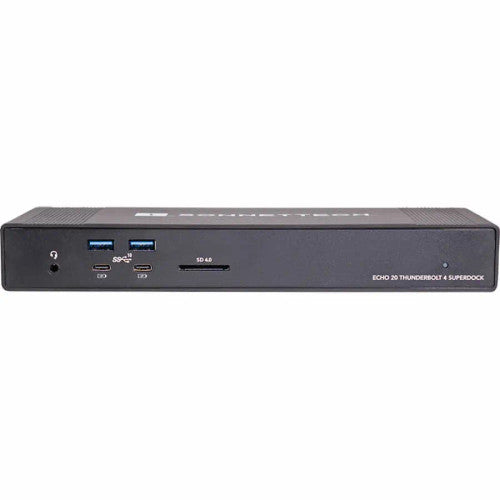
Sonnet Echo 20 Thunderbolt 4 SuperDock
The Echo 20 Thunderbolt 4 SuperDock remains a highly capable workstation dock for users who want extensive connectivity and the convenience of internal NVMe storage without needing Thunderbolt 5.
Its internal M.2 NVMe slot supports up to 8TB of storage, with transfer speeds up to approximately 800MB/s. That makes it particularly useful for documents, media libraries, general working storage and Time Machine backups rather than ultra-high-speed scratch storage.
- Thunderbolt 4 connectivity
- Internal M.2 NVMe SSD slot — up to 8TB
- Up to 800MB/s internal SSD performance
- 2.5 Gigabit Ethernet
- Eight 10Gbps USB ports
- HDMI connectivity
- Up to 100W laptop charging
Choose the Echo 20 TB4 if: you want a comprehensive dock with internal storage and don't need Thunderbolt 5, 10Gb Ethernet or 140W charging.
View Sonnet Echo 20 Thunderbolt 4 SuperDock →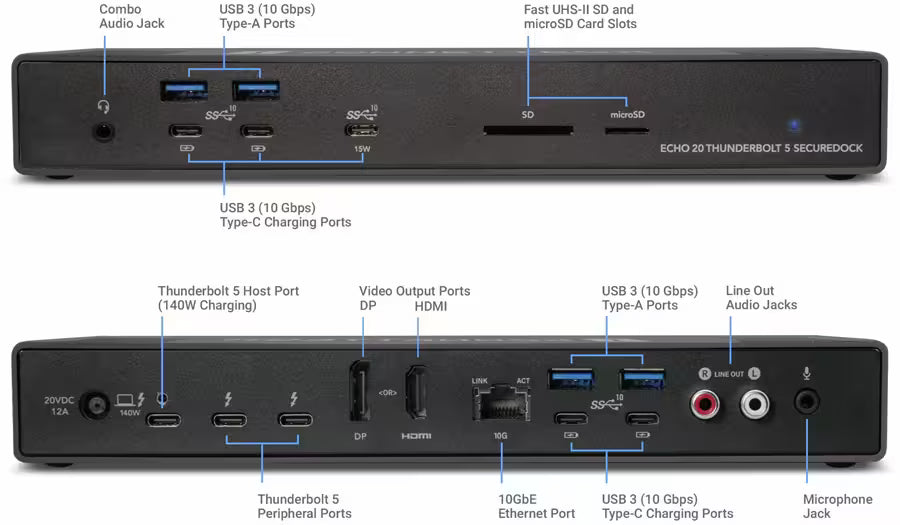
Sonnet Echo 20 Thunderbolt 5 SecureDock
Despite sharing the Echo 20 name, the Thunderbolt 5 SecureDock is not simply a faster replacement for the Echo 20 Thunderbolt 4. It is designed around a different requirement: high-performance workstation connectivity without internal storage.
It combines Thunderbolt 5 with built-in 10 Gigabit Ethernet, extensive 10Gbps USB connectivity, dedicated HDMI and DisplayPort connections and up to 140W laptop charging.
- Thunderbolt 5 connectivity
- No internal storage
- 10 Gigabit Ethernet with multi-gigabit support
- HDMI and DisplayPort video outputs
- Multiple 10Gbps USB-A and USB-C ports
- UHS-II SD and microSD card readers
- Up to 140W laptop charging
Choose the Echo 20 TB5 if: you need Thunderbolt 5, 10Gb networking and extensive workstation connectivity but don't need — or don't want — internal storage inside the dock.
View Sonnet Echo 20 Thunderbolt 5 SecureDock →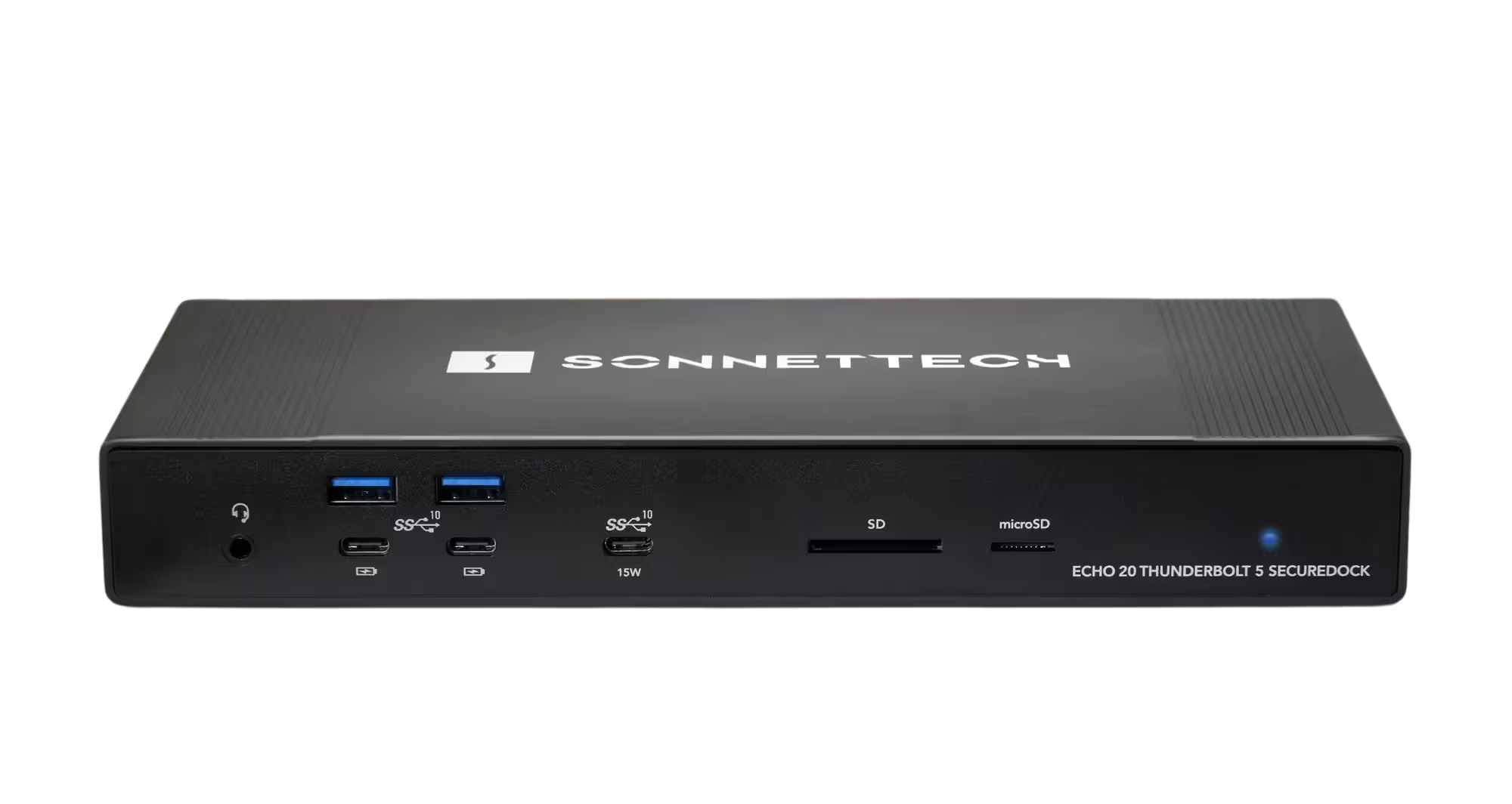
Sonnet Echo 21 Thunderbolt 5 SuperDock
The Echo 21 is the workstation-focused model in Sonnet's Thunderbolt 5 dock range. It combines high-speed networking, extensive peripheral connectivity, display connections and internal NVMe storage in a single dock.
Its internal M.2 NVMe slot supports up to 8TB of storage with performance around 3300MB/s, while built-in 10Gb Ethernet makes it particularly attractive for professional NAS, server and shared-storage workflows.
- Thunderbolt 5 connectivity
- Internal M.2 NVMe SSD slot — up to 8TB
- Internal NVMe performance up to approximately 3300MB/s
- 10 Gigabit Ethernet
- Extensive 10Gbps USB connectivity
- Dedicated HDMI and DisplayPort connections
- UHS-II SD and microSD card readers
- Up to 140W laptop charging
Choose the Echo 21 if: you want the most comprehensive workstation-oriented Sonnet Thunderbolt 5 dock with both 10GbE and internal NVMe expansion.
View Sonnet Echo 21 Thunderbolt 5 SuperDock →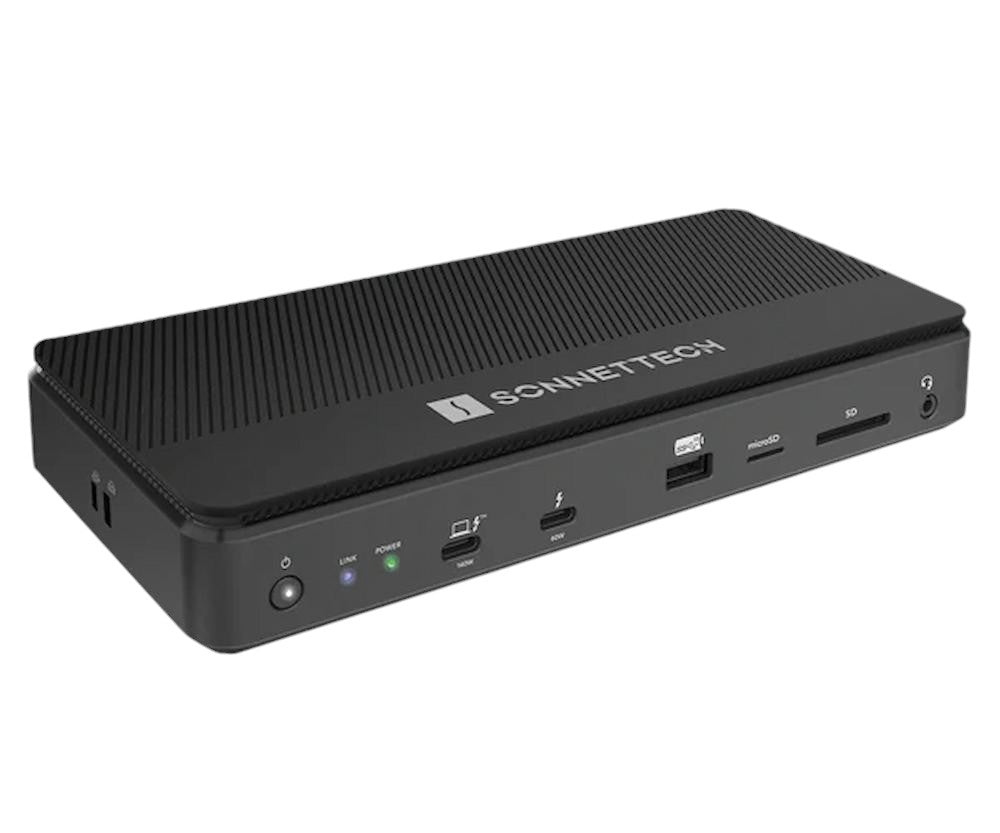
Sonnet Echo 13 Thunderbolt 5 SSD Dock
The Echo 13 takes a different approach. Instead of trying to provide every possible workstation connection, it places much greater emphasis on high-performance integrated NVMe storage.
Install a compatible M.2 NVMe SSD and the dock can deliver storage performance up to 6600MB/s on a suitable Thunderbolt 5 computer. It can be purchased with an empty M.2 slot for installing your own compatible SSD, or with pre-installed SSD storage for a ready-to-use solution.
- Thunderbolt 5 connectivity
- M.2 NVMe SSD slot supporting up to 8TB
- Up to 6600MB/s with suitable SSD and Thunderbolt 5 host
- Available with or without pre-installed SSD storage
- Three downstream Thunderbolt ports
- 2.5 Gigabit Ethernet
- SD and microSD card readers
- Up to 140W laptop charging
Choose the Echo 13 if: you want your dock to double as genuinely high-performance NVMe working storage and don't require the Echo 21's built-in 10GbE and broader workstation connectivity.
View Sonnet Echo 13 Thunderbolt 5 SSD Dock →Sonnet Echo 13 vs Echo 21: What's the Difference?
The Echo 13 and Echo 21 are likely to be the two models many Thunderbolt 5 users compare most closely because both combine docking with internal NVMe storage. The difference is what each product prioritises.
Choose Echo 13
Choose the Echo 13 when storage performance is the priority. Its internal NVMe implementation can deliver significantly higher storage speeds, making it particularly suitable for video editing, photography, large project files and other storage-intensive workflows.
Choose Echo 21
Choose the Echo 21 when workstation connectivity is the priority. You gain built-in 10Gb Ethernet, dedicated display connections and more extensive peripheral connectivity while still retaining fast internal NVMe storage.
Put simply: Echo 13 is the SSD-focused Thunderbolt 5 dock. Echo 21 is the workstation-focused Thunderbolt 5 dock with SSD expansion.
Echo 20 Thunderbolt 4 vs Echo 20 Thunderbolt 5
The shared Echo 20 name can make these docks appear to be two generations of the same product, but their design priorities are quite different.
Echo 20 Thunderbolt 4
Includes internal M.2 NVMe storage, 2.5Gb Ethernet and up to 100W laptop charging. It remains a strong choice when you want extensive connectivity and internal storage but don't need Thunderbolt 5.
Echo 20 Thunderbolt 5
Removes internal storage and instead focuses on Thunderbolt 5 workstation connectivity, 10Gb Ethernet, dedicated video outputs and up to 140W laptop charging.
Therefore, the Thunderbolt 4 model should not automatically be dismissed simply because a Thunderbolt 5 Echo 20 exists. The right model depends on whether integrated storage or newer high-bandwidth workstation connectivity matters more to your setup.
Which Sonnet Thunderbolt Dock Should You Choose?
Rather than choosing simply by model number, match the dock to what you actually need from your workstation.
Why Combine Docking and Storage?
For MacBook Pro and other laptop-based workstations, a dock can turn a portable computer into a complete desktop setup through a single cable. Displays, networking, external peripherals, card readers and power can remain connected to the dock while the computer can be disconnected whenever you need to leave.
Models such as the Echo 13, Echo 20 Thunderbolt 4 and Echo 21 take this further by integrating NVMe storage into the dock itself. This can reduce desktop clutter and provide immediately available storage whenever the computer is connected.
The important point is that not all integrated storage performs at the same speed. The Echo 20 Thunderbolt 4 is suitable for general storage and backup, the Echo 21 provides considerably faster working storage, while the Echo 13 is specifically designed around high-performance NVMe storage.
Why Buy Sonnet from Flexx Memory?
We specialise in Mac, Thunderbolt, storage and professional connectivity solutions and can help you choose the right dock for your actual workflow.
Thunderbolt dock capabilities can vary between Mac generations and processors. If you're unsure about displays, charging, networking or storage compatibility, ask us before ordering.
Flexx Memory is a UK specialist retailer supplying Sonnet products for individual, business and professional customers.
Sonnet Thunderbolt Dock FAQ
Which Sonnet dock has the fastest internal SSD?
The Echo 13 Thunderbolt 5 SSD Dock is the storage-focused model. With a suitable compatible NVMe SSD and Thunderbolt 5 host, storage performance can reach up to 6600MB/s. Actual performance depends on the SSD, computer and configuration.
Which Sonnet docks have 10Gb Ethernet?
The Echo 20 Thunderbolt 5 SecureDock and Echo 21 Thunderbolt 5 SuperDock include built-in 10 Gigabit Ethernet. The Echo 20 Thunderbolt 4 and Echo 13 Thunderbolt 5 use 2.5 Gigabit Ethernet.
Which Sonnet Thunderbolt 5 docks have an M.2 NVMe SSD slot?
The Echo 13 Thunderbolt 5 SSD Dock and Echo 21 Thunderbolt 5 SuperDock include internal M.2 NVMe storage expansion. The Echo 20 Thunderbolt 5 SecureDock does not include internal storage.
Can I install my own SSD in the Sonnet Echo 13?
Yes. The Echo 13 is available without an SSD so you can install your own compatible M.2 NVMe drive up to 8TB. Flexx also offers configurations with pre-installed SSD storage for customers who prefer a ready-to-use solution. Check current SSD compatibility before installing your own drive.
Do I need a Thunderbolt 5 Mac to use a Thunderbolt 5 Sonnet dock?
Not necessarily. Compatibility depends on the individual dock and host computer, and some models can operate with compatible Thunderbolt 4, Thunderbolt 3 or USB4 systems. However, maximum Thunderbolt 5 bandwidth, SSD performance and display capabilities require an appropriate host. Always check compatibility for your specific Mac or PC.
Which Sonnet dock should I consider for a MacBook Pro workstation?
It depends on the workflow. The Echo 21 is designed around extensive workstation connectivity, 10GbE and NVMe expansion. The Echo 13 prioritises high-speed integrated SSD storage. The Echo 20 Thunderbolt 5 is useful where onboard storage isn't required, while the Echo 20 Thunderbolt 4 remains a strong option where Thunderbolt 5 isn't necessary.
Is the Echo 20 Thunderbolt 4 still worth considering?
Yes. Thunderbolt 5 is newer and provides greater bandwidth, but not every workflow requires it. If your computer uses Thunderbolt 4 or your priority is extensive connectivity with convenient internal NVMe storage, the Echo 20 Thunderbolt 4 remains a practical option.