0800 195 4072
Free Shipping

Key Features

Compatibility

Product Description
Includes everything needed to replace your optical drive with a second hard drive or SSD.
Boost your storage capacity by adding up to an additional 2.0TB of internal storage with a second hard drive, or enjoy near-instantaneous boot and app loading times by adding a Solid State Drive (SSD). Configuration flexibility is yours when you replace your 2009-2011 iMac's internal SuperDrive with an OWC Data Doubler with a hard drive or SSD.
The custom-engineered Data Doubler bracket comes ready to mount any 2.5" SATA drive up to 12.5mm in height. Once you've installed the entire Data Doubler drive assembly into your 2009-2011 iMac's optical drive bay, you can customize how you want your internal storage to perform.
Drive customization is easy and built right into OS X as the new Data Doubler mounted drive can be setup using Apple's Disk Utility program in which you can format the drive, create a RAID array using two drives together, or partition the new drive. Once formatted you can also setup the second drive as a Time Machine backup so you can take your backup with your wherever you go.
OWC provides free installation videos that guide this DIY upgrade step-by-step for each specific Mac model. Data Doubler also comes backed by OWC's award-winning U.S.A. based technical support team which is readily available to assist you with your upgrade should you have any questions.
Supports: SATA 6Gb/s, 3Gb/s & 1.5Gb/s
Interface: 2.5" Drive or SSD (Solid State Drive) of up to 12.5mm height.
*Professional installation of Data Doubler into an iMac is highly recommended due to the degree of installation difficulty.
What is in the box?
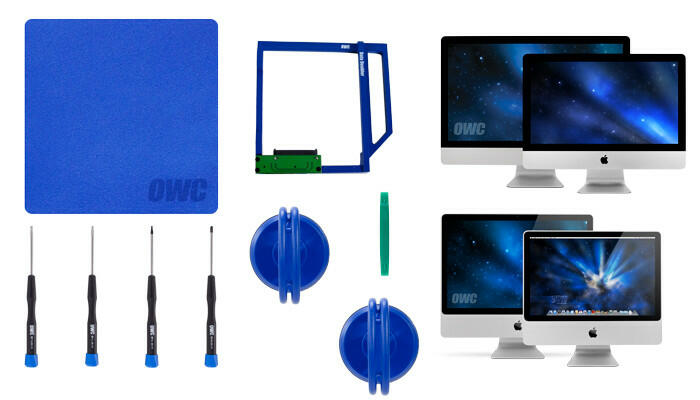
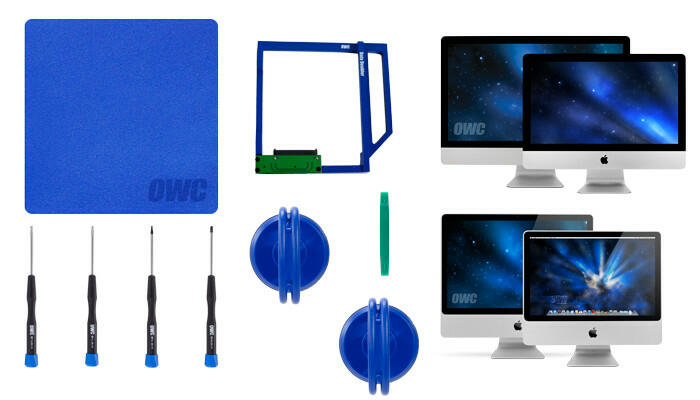
- 1 x OWC Data Doubler Optical Bay Mounting Solution
- 2 x OWC 2-1/4" Suction Cup
- 1 x Torx T10 driver
- 1 x Torx T8 driver
- 1 x Torx T6 driver
- 1 x Phillips #00 driver
- 1 x Nylon Pry Tool (Spudger)
- 1 x OWC Blue Microfiber Screen Cleaning Cloth
Specifications
- Interface
- Apple Model Specific; SATA III; SATA II
- Color
- Blue
- Material
- Aluminum
- Dimensions
- Height: 1.3 cm (0.5 in)
- Length: 12.7 cm (5.0 in)
- Width: 10.2 cm (4.0 in)
- Weight
- 76.0 g (0.17 lbs)
Compatibility
- iMac (27-inch Mid 2011) (May, 2011) Model ID: iMac12,2 | 2.7GHz i5, 3.1GHz i5, 3.4GHz i7
- iMac (21.5-inch Mid 2011) (May, 2011) Model ID: iMac12,1 | 2.5GHz i5, 2.7GHz i5, 2.8GHz i7
- iMac (27-inch Mid 2010) (July, 2010) Model ID: iMac11,3 | 2.8GHz i5, 2.93GHz i5, 3.6GHz i7
- iMac (27-inch Mid 2010) (July, 2010) Model ID: iMac11,3 | 2.8GHz, 2.93GHz, 3.2GHz, 3.6GHz
- iMac (21.5-inch Mid 2010) (July, 2010) Model ID: iMac11,2 | 3.6GHz i5
- iMac (21.5-inch Mid 2010) (July, 2010) Model ID: iMac11,2 | 3.06GHz, 3.2GHz, 3.6GHz
- iMac (27-inch Late 2009) (October, 2009) Model ID: iMac11,1 | 2.66GHz i5, 2.8GHz i7
- iMac (27-inch Late 2009) (October, 2009) Model ID: iMac10,1; iMac11,1 | 2.66GHz, 2.8GHz, 3.06GHz, 3.33GHz
- iMac (21.5-inch Late 2009) (October, 2009) Model ID: iMac10,1 | 3.06GHz, 3.33GHz
- iMac (24-inch Early 2009) (March, 2009) Model ID: iMac9,1 | 2.66GHz, 2.93GHz, 3.06GHz
- iMac (20-inch Early 2009) (March, 2009) Model ID: iMac9,1 | 2.66GHz
This OWC 6G SSD Model is compatible with most 2009-2011 iMac models including:
iMac 2006-current (All Intel Models) NOTE exceptions below
Special note for specific 2009 iMacs.
iMac models with model ID:
iMac10,1
iMac11,1
While a 6G SSD does function, it will only do so at SATA Revision 1.0 (1.5Gb/s, 150MB/s) speeds rather that the SATA Revision 2.0 (3.0Gb/s 300MB/s) speed the computer can deliver.
The Mercury Electra 3G SSD is the OWC-recommended upgrade option for the iMacs listed in the special note above.
Product Videos
Shipping & VAT
- Free UK Shipping: Delivered in approx. 2 working days
- Express Options: Faster methods available at checkout
- Free Shipping to Ireland: For orders over £100.00
- International Delivery: Times vary by destination; shipped via FedEx or DHL
- 30-Day Returns: Return within 30 days from order date
- UK, Ireland and EU Customers: Free return label provided
- Full Return Policy: Read Here
- Full Shipping Details: Read Here
VAT & Duties Information
UK & EU Customers: The price shown on our website is the final price you pay. No additional VAT, customs duties, or import fees will be charged upon delivery.
Orders are dispatched from Northern Ireland, allowing us to serve customers across the United Kingdom and the European Union without unexpected import charges.
Non-UK and non-EU destinations: Local taxes, customs duties, and import fees may apply and are the responsibility of the recipient.
Payment
Safe payment on our website.
Pay by card, Klarna, PayPal, Apple Pay, G-Pay, Shop Pay, Revolut, Bancontact, iDeal, or even bank transfer.
Customer Service
Email and chat available 24/7
Free number UK: 08001954072
International: +442838341148
Phone Line Opening Hours
- Monday - Friday: 09:00-17:00



OWC Data Doubler Optical Bay Hard Drive/SSD Mounting Solution with tools (for iMac 2009-2011)
Includes everything needed to replace your optical drive with a second hard drive or SSD.
Boost your storage capacity by adding up to an additional 2.0TB of internal storage with a second hard drive, or enjoy near-instantaneous boot and app loading times by adding a Solid State Drive (SSD). Configuration flexibility is yours when you replace your 2009-2011 iMac's internal SuperDrive with an OWC Data Doubler with a hard drive or SSD.
The custom-engineered Data Doubler bracket comes ready to mount any 2.5" SATA drive up to 12.5mm in height. Once you've installed the entire Data Doubler drive assembly into your 2009-2011 iMac's optical drive bay, you can customize how you want your internal storage to perform.
Drive customization is easy and built right into OS X as the new Data Doubler mounted drive can be setup using Apple's Disk Utility program in which you can format the drive, create a RAID array using two drives together, or partition the new drive. Once formatted you can also setup the second drive as a Time Machine backup so you can take your backup with your wherever you go.
OWC provides free installation videos that guide this DIY upgrade step-by-step for each specific Mac model. Data Doubler also comes backed by OWC's award-winning U.S.A. based technical support team which is readily available to assist you with your upgrade should you have any questions.
Supports: SATA 6Gb/s, 3Gb/s & 1.5Gb/s
Interface: 2.5" Drive or SSD (Solid State Drive) of up to 12.5mm height.
*Professional installation of Data Doubler into an iMac is highly recommended due to the degree of installation difficulty.
What is in the box?
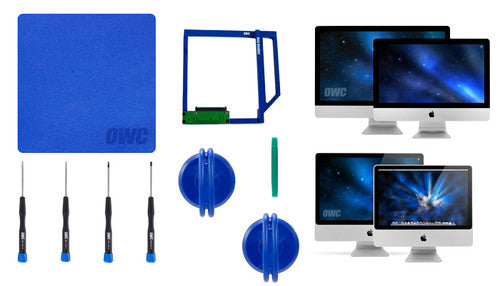
- 1 x OWC Data Doubler Optical Bay Mounting Solution
- 2 x OWC 2-1/4" Suction Cup
- 1 x Torx T10 driver
- 1 x Torx T8 driver
- 1 x Torx T6 driver
- 1 x Phillips #00 driver
- 1 x Nylon Pry Tool (Spudger)
- 1 x OWC Blue Microfiber Screen Cleaning Cloth
- Interface
- Apple Model Specific; SATA III; SATA II
- Color
- Blue
- Material
- Aluminum
- Dimensions
- Height: 1.3 cm (0.5 in)
- Length: 12.7 cm (5.0 in)
- Width: 10.2 cm (4.0 in)
- Weight
- 76.0 g (0.17 lbs)
- iMac (27-inch Mid 2011) (May, 2011) Model ID: iMac12,2 | 2.7GHz i5, 3.1GHz i5, 3.4GHz i7
- iMac (21.5-inch Mid 2011) (May, 2011) Model ID: iMac12,1 | 2.5GHz i5, 2.7GHz i5, 2.8GHz i7
- iMac (27-inch Mid 2010) (July, 2010) Model ID: iMac11,3 | 2.8GHz i5, 2.93GHz i5, 3.6GHz i7
- iMac (27-inch Mid 2010) (July, 2010) Model ID: iMac11,3 | 2.8GHz, 2.93GHz, 3.2GHz, 3.6GHz
- iMac (21.5-inch Mid 2010) (July, 2010) Model ID: iMac11,2 | 3.6GHz i5
- iMac (21.5-inch Mid 2010) (July, 2010) Model ID: iMac11,2 | 3.06GHz, 3.2GHz, 3.6GHz
- iMac (27-inch Late 2009) (October, 2009) Model ID: iMac11,1 | 2.66GHz i5, 2.8GHz i7
- iMac (27-inch Late 2009) (October, 2009) Model ID: iMac10,1; iMac11,1 | 2.66GHz, 2.8GHz, 3.06GHz, 3.33GHz
- iMac (21.5-inch Late 2009) (October, 2009) Model ID: iMac10,1 | 3.06GHz, 3.33GHz
- iMac (24-inch Early 2009) (March, 2009) Model ID: iMac9,1 | 2.66GHz, 2.93GHz, 3.06GHz
- iMac (20-inch Early 2009) (March, 2009) Model ID: iMac9,1 | 2.66GHz
This OWC 6G SSD Model is compatible with most 2009-2011 iMac models including:
iMac 2006-current (All Intel Models) NOTE exceptions below
Special note for specific 2009 iMacs.
iMac models with model ID:
iMac10,1
iMac11,1
While a 6G SSD does function, it will only do so at SATA Revision 1.0 (1.5Gb/s, 150MB/s) speeds rather that the SATA Revision 2.0 (3.0Gb/s 300MB/s) speed the computer can deliver.
The Mercury Electra 3G SSD is the OWC-recommended upgrade option for the iMacs listed in the special note above.
Customer Reviews
Everything you need for the job. It's all top quality equipment, especially the star of the show - the bracket itself. Installation was surprisingly straightforward and took less time than expected thanks to the handy linked video. Very satisfied with the product, shipping and customer service.
Installed in iMac Late 2009